Opt-In Management
Opt-In Management helps businesses manage customer consent for receiving communications and promotional messages.
Overview
Opt-in management is the process of obtaining, tracking, and honoring customer consent for marketing communication.
Customers can automatically opt out of communication by sending predefined keywords such as:
- Stop
- Not Interested
- Quit
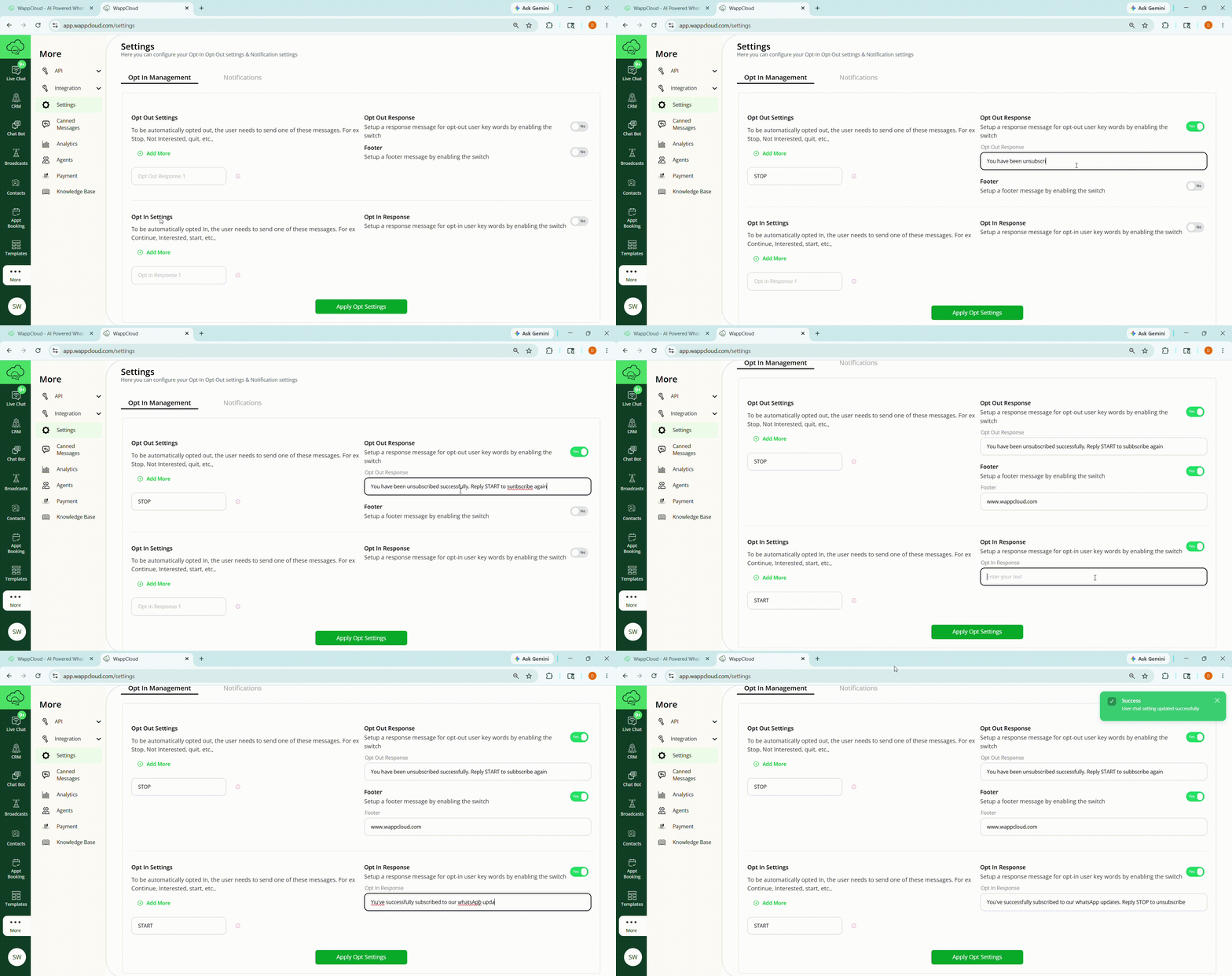
Opt-Out Settings
Steps to Configure Opt-Out Settings
- Navigate to More > Settings.
- Under Opt-Out Settings, click Add More.
- Enter the keywords customers can send to opt out.
- Enable the Opt-Out Response option.
- Enter the opt-out response message to be sent to customers.
- To configure a footer message, enable the footer switch.
- Click Apply Opt Settings.
Opt-In Settings
Customers can automatically opt in again by sending predefined keywords such as:
- Continue
- Interested
- Start
Steps to Configure Opt-In Settings
- Navigate to More > Settings.
- Under Opt-In Settings, click Add More.
- Enter the keywords customers can send to opt in.
- Enable the switch to configure an opt-in response message.
- Click Apply Opt Settings.